All codes and pictures shown in this article are from the sample that can be downloaded at the bottom of the page.
Introduction
Operators are important in the data flow Carmenta Engine. They read features from their input, process or manipulate those features and pass the result to the next operator. In the typical case, operators are added and configured in a configuration file, and calls are managed by the map view without direct user interaction with the operators.
But in some cases a more custom approach is necessary, and the application needs to access the operators directly from the code through a call to the GetFeatures method. For example, the application may want to display information produced by the operators or an external component (or service) may want to use the result as input. In this article, we will explain how to approach such a use-case.
Setting up the operator chain
The first step is to get the operator chain set up in your application, there are two ways to do this:
The easiest way is to prepare and configure the operator chain in a map configuration file using Carmenta Studio; then load the file from the code as you would normally do for a map configuration containing a view. But instead of getting hold of a view object, you get the operator using its name as identifier.
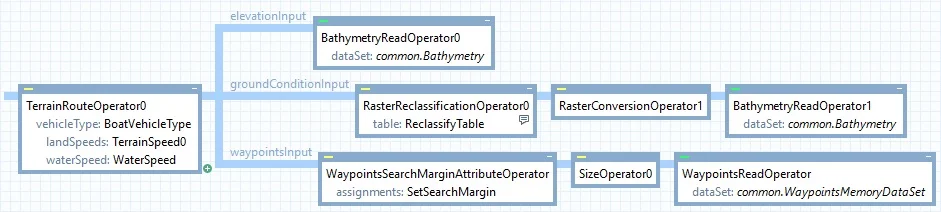
Configuration routingConfig = new Configuration("bathymetry_routing.px");
Operator terrainRouteOperator = routingConfig.GetPublicObject("TerrainRouteOperator0") as Operator;
The second way is to build the operator chain in code. This allows for building operator chains dynamically, where conditions at runtime affect how the operator chain is composed. While this solution can provide more flexibility, it also requires more of the developer to foresee and handle different situations. Therefore, building your operator chain in a map configuration file using Carmenta Studio is the suggested approach if your use case allows for it.
GetFeatures definitions
The second step is to call the GetFeatures method, which retrieves all features produced by the operator chain. The number of features returned depends on the operator used, check the documentation for information on specific operators. In C#, the result is returned as an IEnumerable<Feature>, allowing you to enumerate over all features in the result. In C++, Java, and Python the return type is FeatureEnumerator.
Additionally, depending on the operator called, the features may get new attributes. The documentation indicates if a feature is updated with new attributes and what information these attributes hold.
Note: The GetFeatures method also exists on DataSet and Layer classes, providing the same functionality for retrieving features directly in code.
Thread safety: The GetFeatures method is not thread-safe because it accesses state that belongs to configuration elements. If your application modifies configurations only from the GUI thread while holding the global configuration lock (using a Guard), calls to GetFeatures can generally be made safely. See the Operator documentation for details.
The GetFeatures method has two overloads, described below.
GetFeatures(Crs)
Calling GetFeatures with a Crs will return features projected to the coordinate reference system specified.
Before choosing a Crs, it is good practice to check the documentation about the operator to understand how it works and in which Crs it usually outputs its result. Using an appropriate Crs helps to get an accurate result; for example, a VerticalProfileOperator usually expects a NonGeoreferenced Crs and an EllipseOperator uses the View Crs.
In the code below, the result will contain all features produced by the operator.
var result = terrainRouteOperator.GetFeatures(Crs.Wgs84LongLat);
GetFeatures(Crs, FeatureQuery)
The FeatureQuery parameter will limit the number of returned features. Only the features matching the query will go through, all others will be discarded. To limit the number of features returned, you can use the following properties:
Area limit the features returned to a specific location. The Area coordinates need to be expressed in the same Crs as the one used in GetFeatures.Condition the condition is evaluated for each feature, and like using Condition in a configuration file, you can test feature attributes. If the condition does not match, the feature is not returned.
The FeatureQuery class provides additional properties such as Ids, Resolution, SearchText, and SearchCount. See the FeatureQuery documentation for the full list of available query options.
In the code below, the result will only contain the features with the attribute ‘isLastLeg’ set to true (see documentation about TerrainRouteOperator for more information about the attribute).
FeatureQuery featureQuery = new FeatureQuery();
featureQuery.Condition = new Condition("isLastLeg = true");
var result = terrainRouteOperator.GetFeatures(Crs.Wgs84LongLat, featureQuery);
A note on GetRasterFeature
The Operator class also provides a GetRasterFeature method. Despite the similar naming, GetRasterFeature serves a different purpose from GetFeatures and is intended for operators that produce raster data. This will be covered in a future article.
Complete example using TerrainRouteOperator for nautical routing
The sample describes a simple use-case where a TerrainRouteOperator and the GetFeatures method are used in the code to determine the travel time from start to finish and display it in the UI.
To use the sample:
Conclusion
In this article we covered how to retrieve features from an operator chain in code using the GetFeatures method. While operators are typically managed by the map view through a configuration file, calling GetFeatures directly gives you access to processed feature data for custom use cases — whether for displaying computed results in the UI, feeding data to external components, or filtering features with a FeatureQuery. The approach shown here applies to many operators beyond TerrainRouteOperator; consult the documentation for the specific operator you are using to understand its output features, attributes, and the appropriate coordinate reference system.
References